
Meet Hooba. Your Server. Your Rules
Published
Voice rooms, text channels, gaming features and a space of your own for friends. Create a server you control and bring your people together on it
Every group of friends has its own meeting place. Some get together in the evening to play, some talk about new releases, and some just drop in to chat after work
But what if that place had its own server? With its own channels, voice rooms, members and rules. Without having to depend on someone else’s infrastructure
Meet Hooba. A platform for chatting and gaming together that you can deploy on your own VPS
You create the server, invite your friends and decide for yourself what your community will be like
Hooba — your server. Your rules
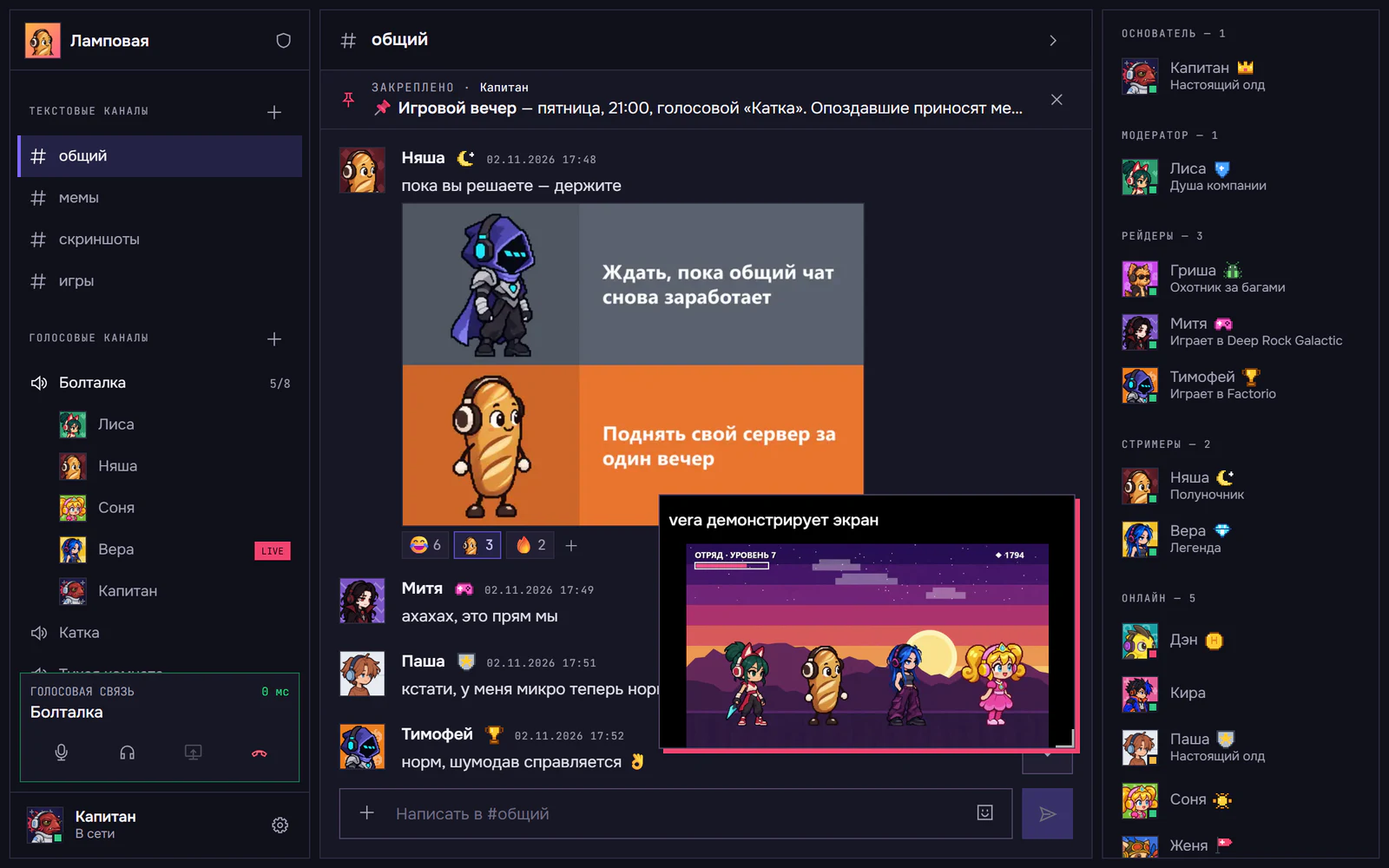
Everything for chatting and playing together
Hooba brings the usual communication tools together in one app. You can text, get together in voice rooms, share your screen and stay in touch while you play
Text channels
Create separate spaces for different topics. Talk about games, share news, send screenshots and memes
One channel for general chat, another for game plans, and a third for everything that doesn’t fit into the first two
Voice rooms
Meet up before a match, talk tactics or just chat while everyone does their own thing
A single voice room can hold up to eight people at once. And you can create several rooms on a server for different groups and activities
Voice comes through with low latency, and noise suppression helps cut out background sounds
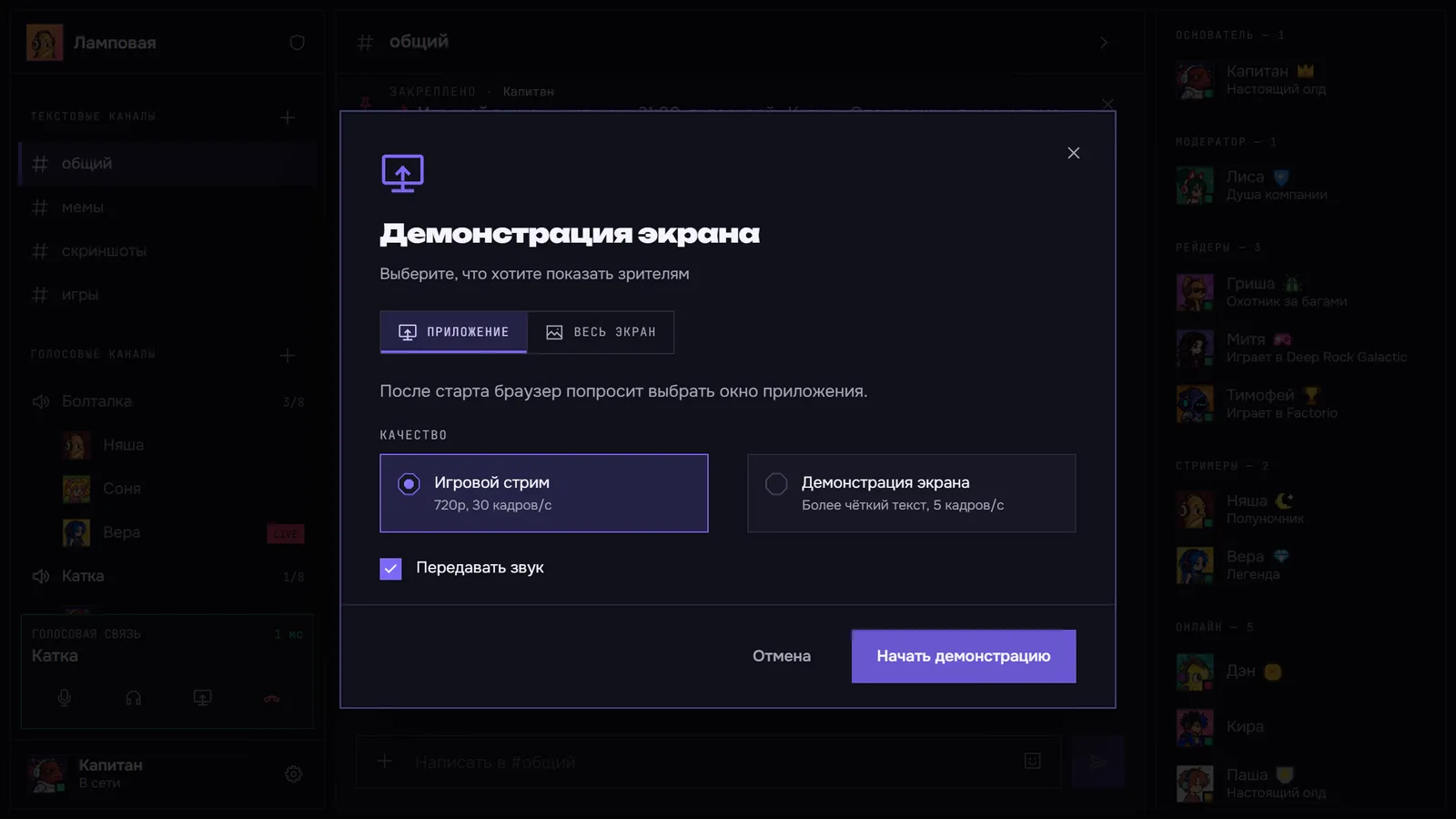
Screen sharing
Show your friends a game, share your desktop or help them sort out yet another technical problem
You can stream your entire screen or a single application. 720p and 1080p modes are available
Game overlay and push-to-talk
You don’t have to keep switching between your game and the app
The game overlay lets you see who’s in the voice room on top of your game. And push-to-talk turns on your mic with a hotkey, even when Hooba is in the background
You can also share your game activity with the members of your community
Make your community truly yours
Every group has its own vibe. Some love serious gaming discussions, some joke around nonstop, and some can talk for hours about everything at once
Hooba lets you do more than chat — it lets you shape a space of your own
Create channels for different games and conversations, appoint admins, assign members to roles and set up access permissions
You can make private channels for your team, a separate room for practice or a general chat open to all members
To keep things in order, there’s member management, bans, reports and a banned-words filter
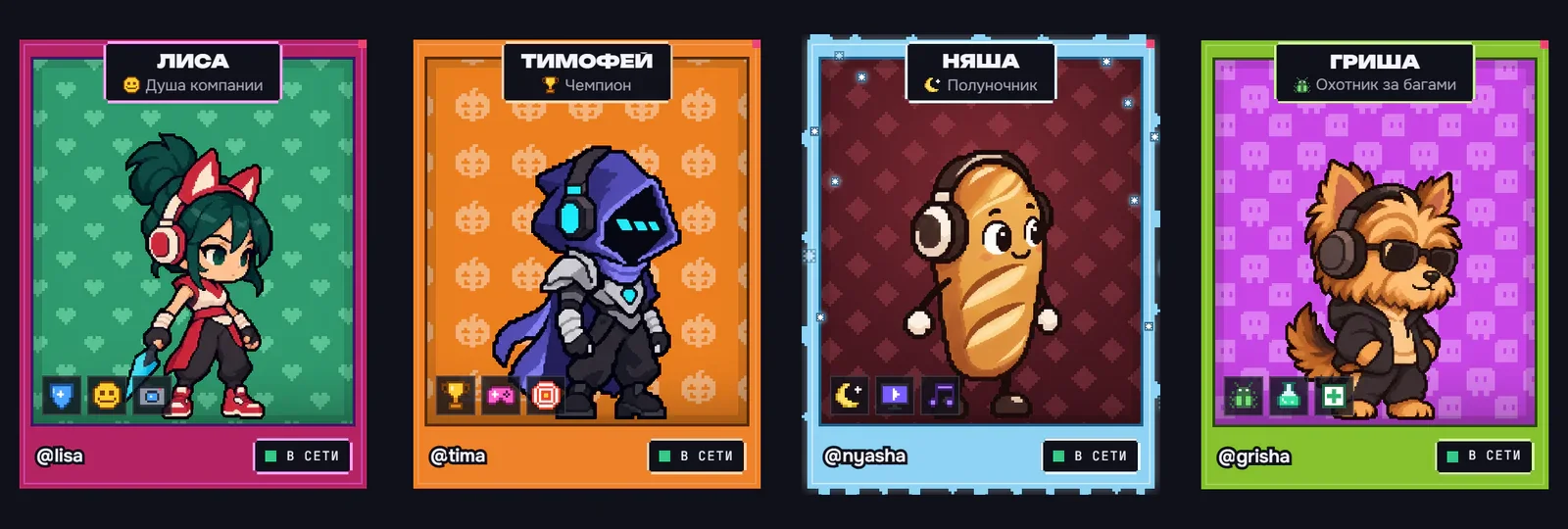
Everyone has their own style
Customize your profile: choose characters, backgrounds, frames, badges and titles
Over time, your community can grow its own atmosphere, and members’ profiles become part of it
Your server — your data
Now for the most important part
Unlike centralized messengers, Hooba doesn’t host all communities on shared infrastructure
Each Hooba server runs on its owner’s VPS. That’s a virtual server you rent from a hosting provider of your choice
It stores member accounts, messages, images, roles, invites and other community data
Hooba has no access to community servers, and this data never reaches us.
We don’t collect a central database of your conversations, we don’t store the accounts of your community members, and we don’t receive their visit history
Our infrastructure is used to run the website and check for app updates. The community itself opens from its owner’s server
What does this mean in practice?
- You choose where the server is located.
- You control access to its infrastructure.
- You decide who to invite to the community.
- You manage how data is stored and deleted.
- You don’t depend on a single Hooba user data store.
Keep in mind, though: self-hosting is not the same as end-to-end encryption. The owner of a VPS can technically read the data stored on their server. So choose an administrator and a provider you trust.
The owner’s VPS
Rented from any hosting provider
Hooba server
- accounts
- messages
- images
- roles
- invites
Members
Friends with an invite
- Windows app
- browser, including on a phone
hooba.space
Only the website and app update checks. Community data never gets here
Who is Hooba for?
We’re building Hooba for people who like spending time together and want a place of their own to talk
Groups of friends
Bring your crew together in one place. Jump into voice rooms, pick a game, make plans and stay in touch even after the match is over
Gaming teams
Organize practice sessions, set aside channels for tactics and discussions, create roles for captains and team members
Guilds and clans
Plan raids, discuss in-game events and keep talking between gaming sessions
Interest communities
Create a place for people who share a passion. Set the rules, invite members and grow a community of your own
Creating your own server is easier than it seems
To launch Hooba, you’ll need a VPS — a virtual Linux server you can rent from a hosting provider
But you won’t have to install dozens of components by hand or configure the app from scratch
There’s a dedicated install script. It downloads Hooba, installs the required components, helps you set up the connection and starts the server
Here’s how it goes — there’s also a short version on the home page:
- Rent a VPS. Pick a virtual server that meets Hooba’s requirements. Configuration recommendations and the required network settings are in the documentation
- Connect to the server. Use SSH to open a terminal on your VPS
- Run the installer. Run the single command from the guide. The installer prepares the environment and deploys the required services on its own
- Create a community. Open your server’s address, complete the initial setup and create the owner account
- Invite your friends. Send them invite links. Members won’t have to rent their own VPS or install a server themselves
A detailed guide, VPS requirements and maintenance recommendations are available in the Hooba documentation
How much does your own server cost?
The Hooba platform itself is free. Community members don’t need to pay for a subscription or buy separate access to voice rooms and text channels
The owner’s main expense is renting a VPS
You choose the hosting provider and plan yourself, depending on the size of your community and the expected load
All your friends need to join your server is an invite
So you pay for your own infrastructure, not for the number of members in your community
What else should you know?
Hooba keeps evolving, so before launching it’s worth getting to know its current features and limitations
- The client is available for Windows. You can also connect through a browser, including on a phone
- A single voice room can hold up to eight members at once
- Screen sharing is available in 720p and 1080p
- Sending images is supported, but arbitrary files can’t be sent yet
- The owner is responsible for VPS uptime, updates and backups
Hooba is an open project. The source code is available on GitHub, so anyone can study the implementation and the license terms
We’re not trying to replace every existing messenger. Our goal is to give people a way to create their own space for talking, without handing control of it to a centralized platform
Bring your people to Hooba
You don’t have to adapt to someone else’s rules or wait for someone to create the perfect place for your crew
You can make it yourself
Create a server, set up channels, invite your friends and turn Hooba into a place you want to come back to
Your server. Your rules. Your people